One cockpit for every AI coding agent

Every coding agent.
One room. Yours.

HiveRail runs the CLI agents you already pay for — side by side, in parallel — each in its own isolated git worktree, all wired to one shared hub of tools. No vendor lock-in. Your keys. Your machine. Bought once.

Claude CodeCodexGemini KimiOpenCodeCursor+ any command
Runs in your browser · one command to start · install as an app anytime · $39 once, no subscription
01

Not another AI subscription.

Most AI coding tools lock you to one model, rent you access by the month, and run your code through their cloud. HiveRail is built the other way around — it orchestrates the agents and accounts you already have, and it stays out of the middle.

No install

A browser app, not a 200MB download

Most tools: a heavyweight desktop install — per-OS installers, SmartScreen warnings, updates to babysit.
HiveRail is a browser app. Run one command and it opens in the browser you already have — then installs as a real app (its own window, its own icon) in one click when you want it. Nothing to download, nothing to uninstall, nothing to update by hand.
Vendor-neutral

Every agent, not one

Most tools: one editor, one built-in assistant.
HiveRail runs Claude Code, Codex, Gemini, Kimi, OpenCode and Cursor together — pick a different model per pane, race them on the same task, and never get locked to a single vendor's tool.
Bring your own keys

Zero token markup

Most tools: resell you model access, metered monthly.
You already pay Anthropic and OpenAI. HiveRail drives those accounts directly — no reseller margin on your tokens, no usage metering by us. What you spend on models is between you and the provider.
Local-first

Runs on your machine

Most tools: your code round-trips their servers.
HiveRail runs on your desktop. Your code and keys never leave your machine — the agents talk only to the providers you chose. The app itself phones home for one thing only: to check your licence.
One hub

Wire a tool once

Most tools: configure MCP servers per agent, per repo.
Connect a tool once — a browser, your memory, a design surface, Linear, your own MCP servers — and every agent gets it through a single hub. Nothing to configure per agent.
Own it

One price, forever

Most tools: $20–40 / seat / month, forever.
$39 once. No seats, no monthly bill, no usage anxiety. The tool is yours — and everything it produces stays on your machine.
02

A hive, not a chat box

Everything is built around one idea: many agents working your codebase at once, safely, sharing the same tools, where you can see them.

Rails

Isolated git worktrees

Every agent works in its own git worktree on its own branch, cut automatically. Agents never trample each other — or your main branch. Review the diff, keep what wins.

Hive

A grid of agents

Claude Code, Codex, Gemini, Kimi, OpenCode, Cursor and your own commands, tiled in one window. Status dots and attention alerts tell you exactly which pane needs you.

MCP aggregator

One hub, every agent

Every agent you spawn routes through a single hub — a browser, your memory, the Design Room, Linear and your own MCP servers. Wire a tool once; nothing to install or configure per agent.

Waggle

Design it, share it, hear back

Any agent can design — every page is measured against real accessibility checks before it certifies. Share it as a private link: your reviewer opens it, points at an element, even tries CSS live on the page — and their feedback lands back in your agent's pane as its next instruction. New versions reach every open page instantly.

Rooms

A room for every job

Cockpit for the grid, the Board for your backlog, the Meter Room for usage and cost, the Merge Yard to review and keep the winner — the whole workflow, one keystroke away.

03

The Waggle loop

The part nobody else has: your agent's work becomes a private, certified page — and your reviewer's feedback becomes your agent's next instruction. Watch one round trip.

hiverail.com/w/… — your reviewer's browser
v1 → v2 AA ✓ certified
We read every
DFM filing.
Ask a question, get an answer built from the filings.
ASK THE DESK ▸
Ask the desk ▸
div.cta>a.btn:nth-of-type(1)
Ask the desk ▸
background:#0d7a4f; color:#fff
TryResetConfirm
New version live — no refresh
your agent's pane — back on your machine
Reviewer feedback on "Home" — 1 comment from Waggle viewers.
<<<UNTRUSTED-REVIEWER-INPUT
[1] sara@client.ae — on `a.btn` ("ASK THE DESK"):
tried this CSS live and confirmed it: background:#0d7a4f
END-UNTRUSTED-REVIEWER-INPUT>>>
◆ regenerating… v2 certified · HELD for your promote
✓ promoted — v2 pushed to every open page
1 agent designs, page certifies 2 you share a private link 3 reviewer points & tries CSS live 4 feedback lands in the pane 5 you promote — every open page updates
04

Plug into how you already work

HiveRail meets your existing backlog and playbooks — turn a ticket into a running agent, and give every agent the same skills in a click.

Board · Linear

Your backlog, dispatched to agents

Connect Linear and your issues appear as a live board in a side pane, right beside your agents. Drag a card onto an agent and it starts working the ticket — a build brief, a PRD, or a test-driven task — on its own rail, and hands back a branch for you to keep. Tokens are encrypted on your device and never leave it.

Skills

Find and install agent skills, fast

A built-in library of agent skills from skills.sh — search it, install with a drop, and bind a skill to any agent so your whole hive runs the same playbook. HiveRail also picks up the skills already in your Claude, Codex and Gemini installs, no re-import. Browse the library →

05

How it works

From open folder to a running agent in your first minute — the first launch spins up a live demo agent for you.

Start it in your browser

Run one command, open the link it prints, and point HiveRail at any folder. It detects your installed agent CLIs and cuts an isolated git rail for every pane it launches — no install to sit through.

Launch the hive

One agent or a full grid — pick a model per pane, hand each a mission, and they share the same hub of tools while working their own rail.

Keep the best

Watch the diffs come in, side by side. Merge the winner back with one click. The rest never touched your branch.

06

Inside HiveRail

Real screenshots from the app.

A 15-second tour — the Cockpit, the MCP aggregator, skills and themes, in motion
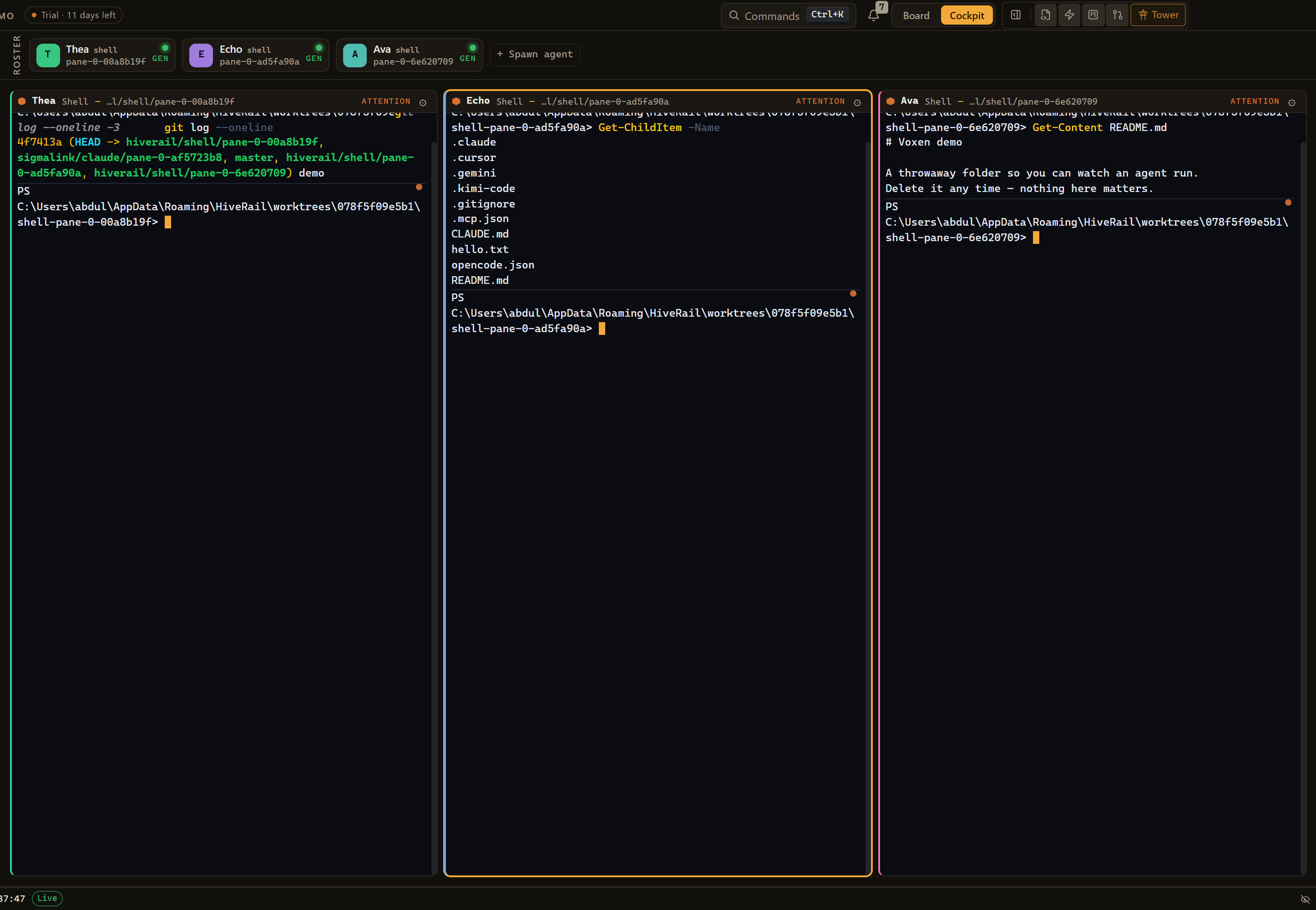
HiveRail Cockpit — three agents, each on its own isolated git rail
The Cockpit — a grid of agents, each on its own isolated git rail, running in parallel
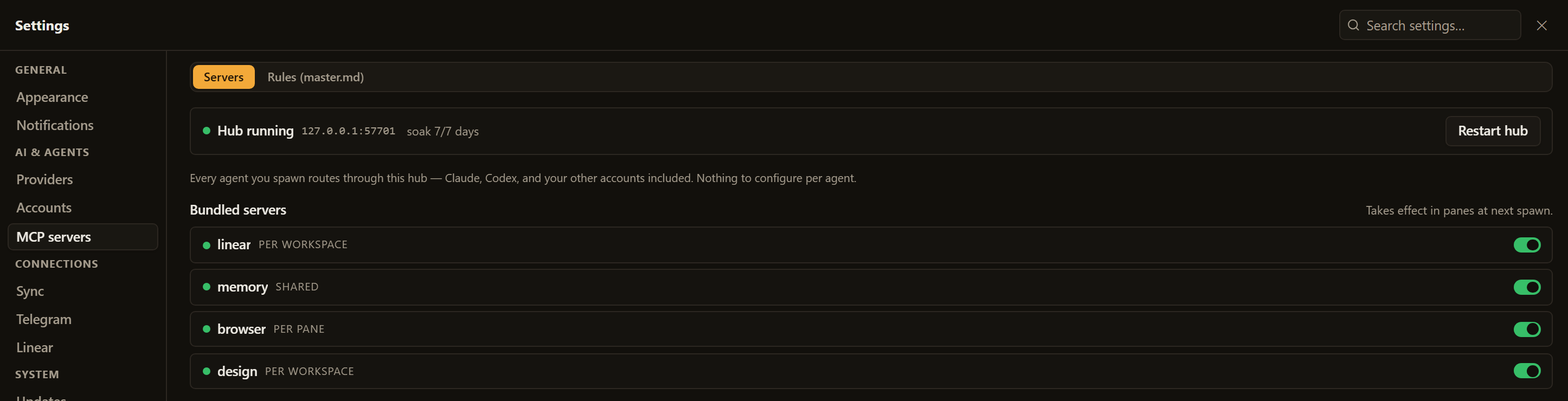
HiveRail MCP hub — one aggregator routing every agent to shared tools
The MCP aggregator — every agent routes through one hub; nothing to install or configure per agent
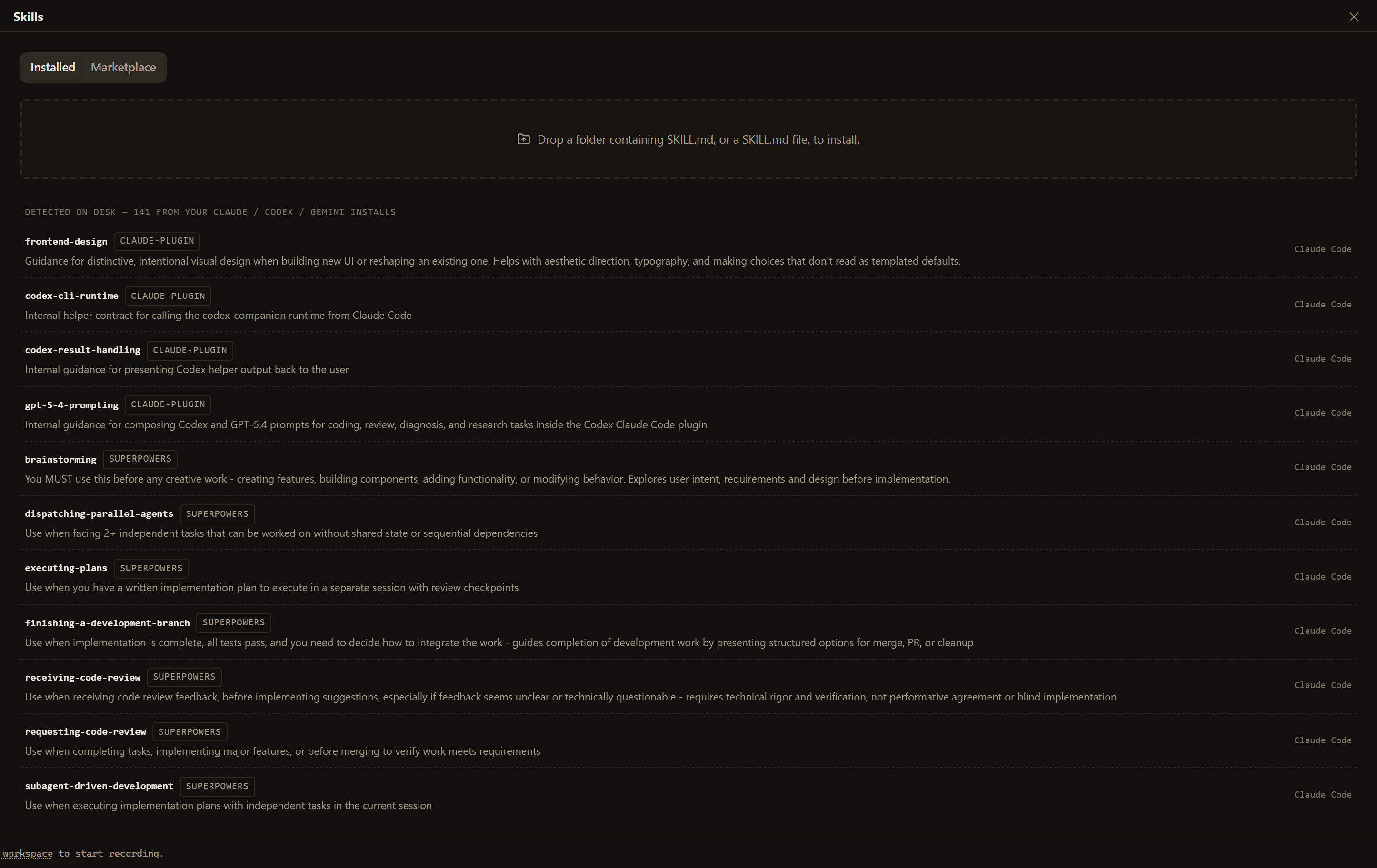
HiveRail Skills room — search the skills.sh library, or use the skills already in your Claude, Codex and Gemini installs
Skills — install from skills.sh, or use the ones already in your Claude, Codex and Gemini installs
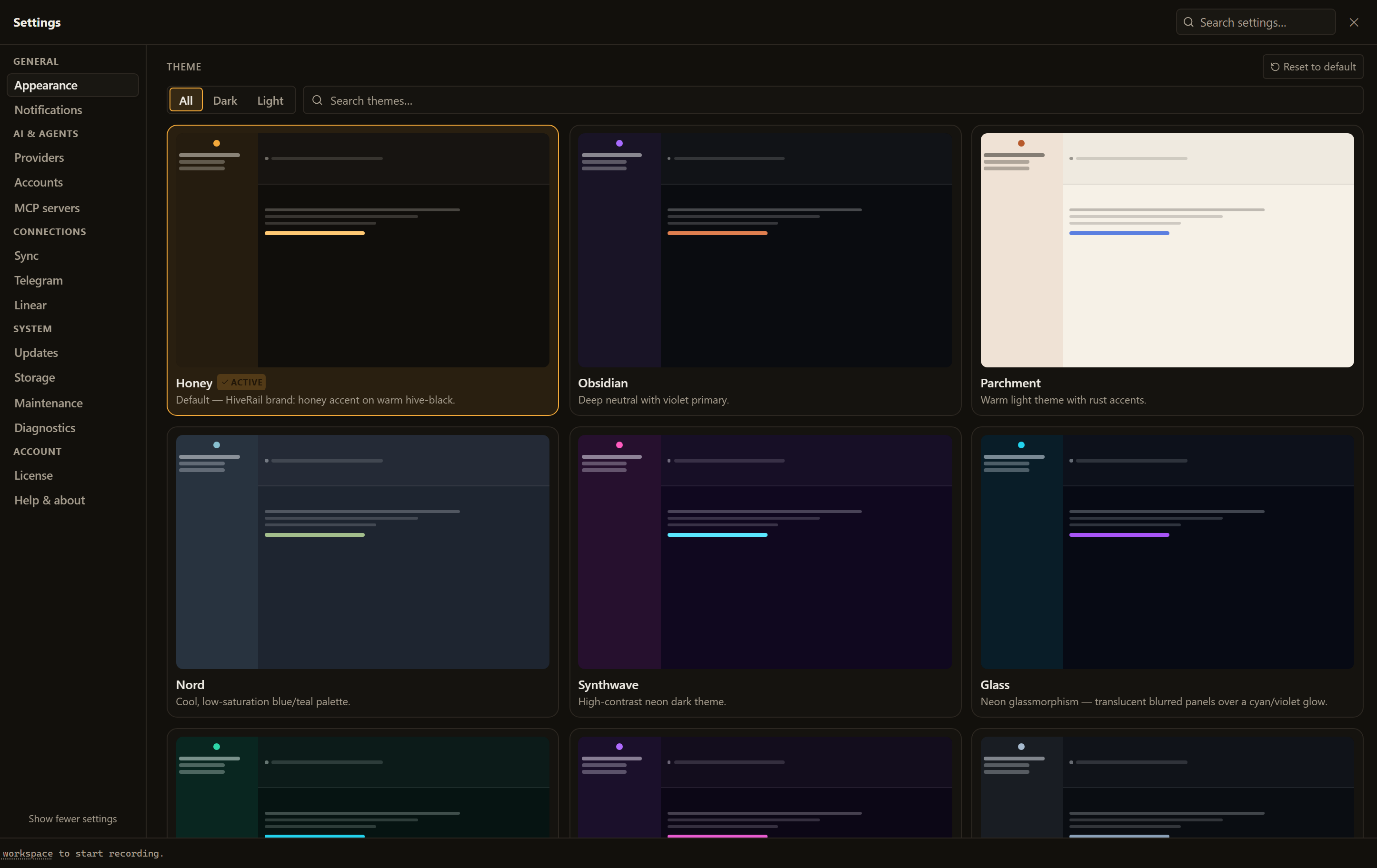
HiveRail Settings — a gallery of themes, grouped navigation and per-provider model pickers
Settings — a theme for every mood, grouped nav, model pickers for every provider
07

One price. Yours forever.

No subscription, no seat licenses, no metering anxiety. HiveRail runs on your machine with your own agent accounts — buy it once and it's yours.

$39
one-time · the whole control room
  • No install — runs in your browser, becomes an app in one click
  • Every agent CLI — Claude, Codex, Gemini, Kimi, OpenCode, Cursor
  • Isolated git rails for parallel, conflict-free work
  • The MCP aggregator — one hub for every agent, plus your own servers
  • Board, Design Room and Waggle review links, built in
  • 14-day free trial, no account needed
  • All your code and keys stay on your machine
Start the free trial
One command to start: npx hiverail — it opens in your browser, and installs as an app whenever you want. Runs on Windows and macOS (needs Node.js — most developers already have it). Your API keys and code never leave your machine.
08

Questions

How is this different from Cursor or a single-agent tool?
Those are one editor wired to one built-in assistant. HiveRail is a control room that runs the CLI agents you already use — many at once, any vendor — on isolated git rails, sharing one hub of tools. It never resells you model access and never locks you to a single provider.
Which AI agents does it work with?
Claude Code, Codex, Gemini CLI, Kimi, OpenCode and Cursor are detected automatically; anything else runs as a custom command. HiveRail orchestrates the tools you already pay for — it doesn't resell AI.
Do I need my own API keys or subscriptions?
Yes — HiveRail drives the agent CLIs you're already signed into (e.g. your Claude subscription). That's the point: no middleman markup on your tokens, no metering by us.
What's the MCP aggregator?
An in-app MCP hub every agent routes through. Connect a tool once — a browser, your memory, the Design Room, Linear, or your own MCP servers — and every agent reaches it through one connection, with nothing to install or configure per agent or per repo.
What are "rails"?
Git worktrees. Every agent pane gets its own working copy on its own branch, cut automatically. Agents work in parallel without conflicts, and nothing merges until you click Keep.
Does my code leave my machine?
No. Your code and keys stay on your machine — HiveRail never uploads them. Your code goes only where your own agent CLIs send it, to the providers you chose, on your own accounts. The app itself talks to our servers for three things only: checking your licence, the relay (if you turn it on) that lets you open your machine from another browser, and any page you explicitly share as a Waggle link — that one page is published so the people you name can open it; nothing else goes with it.
Can I share work with someone who doesn't use HiveRail?
Yes — that's Waggle. Your agent designs a page, it passes real accessibility checks, and you share it as a private link. Only the people you allow by email can open it, after signing in. They comment, press-and-hold (or point-and-click) to mark the exact element they mean, and can even try CSS live on the page before confirming it. Their feedback routes straight back into your agent's pane, and when you approve the new version it appears on every open page instantly. HiveRail sends no email — you send the link yourself.
Do I have to install anything?
No download, no installer. Run one command — npx hiverail — and HiveRail opens in the browser you already have. Want it as a standalone app with its own window and dock icon? Click Install — that's a lightweight browser feature (a PWA), not a 200MB download. It only needs Node.js, which most developers already have.
Which platforms does it run on?
Windows and macOS today. Because HiveRail runs as a small local engine you open in your browser, there's no per-OS app to download — the same one command starts it on either.
Is there a trial?
14 days, full-featured, no account needed. When it ends, HiveRail locks until you unlock it — a one-time $39 licence, then it's yours for good.